

December Newsletter
Happy New Year, Pixel FX family!
Before we dive into the news, we want to extend a giant THANK YOU to everyone who has supported us this past year. From buying our products to posting reviews and installs on social media–or even just chatting in our Discord–our fans are what truly keep us going.2025 was a huge year for us with the release of the Morph Analog Bridge and the Wii RetroGEM, and we’re looking forward to bringing you some fantastic new retro gaming products in 2026! Now, let’s kick off 2026 with some exciting updates!
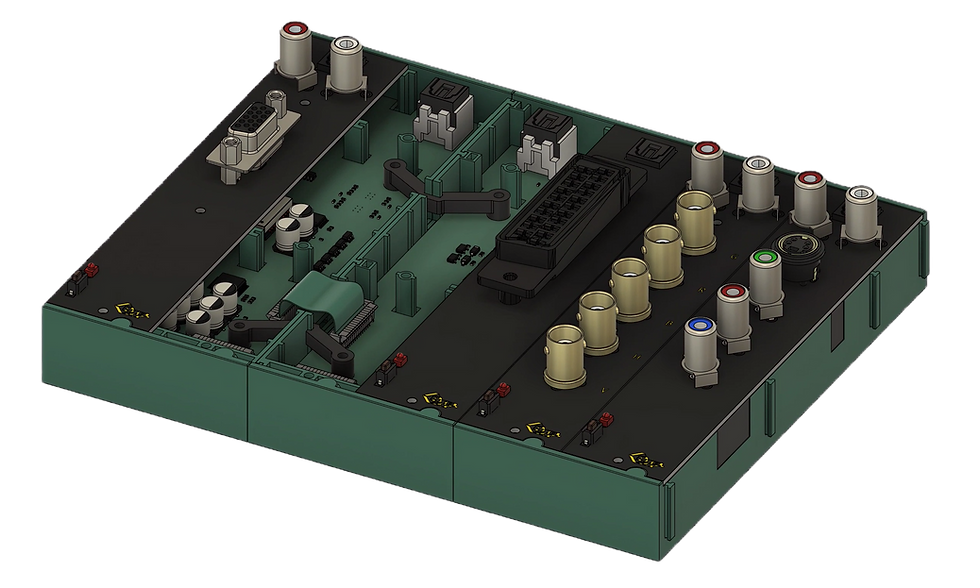
Infinity Switch Update
It’s been a while since we’ve shared any news about the Infinity Switch, our modular video input switching system.
While it is still undergoing engineering development, we wanted to share that the modular case design has been finalized, and we have placed an order for the injection mold. This does not indicate that we’ve begun any sort of batch production of cases, but we hope this communicates that we are serious about building and releasing this product.
We hope to have more details about the Infinity Switch for you this year, so stay tuned!
Firmware 3.15.6 is now available
For Retro GEM/Digitals and Morph 4K on all update channels.
Changes since previous stable version (highlights):
WiFi
Firmware updates are now distributed using a CDN (Content Delivery Network)(starting with this version)
Added WiFi speedtest to check actual usable WiFi quality
Streamlined WiFi setup wizard to prevent a user to accidentally lock out of the WebUI
Fixed two bugs which could cause a crash while/after a connection was established
Morph 4K: Read optional “/sdcard/network.ini” file for WiFi setup (https://docs.pixelfx.co/Morph4K-network-ini.html)
Video/Audio
Added Magiclock 2 (aka "genlock") (currently available for Morph 4K, Retro GEM GC/Wii)
Extract native modeline from EDID on power-up / hotplug (or fall back to 1080p when it's above the TX limits)
Added free width/height scaler adjustments
Make DAR/PAR fully adjustable (adjust numerator/denominator separately)
Added CEC OTP (One Touch Play) enable/disable setting
Morph 4K: Added audio mute (mapped to mute button on IR remote)
Morph 4K: Read back/mark "Max Avg. Luminance" and "Max Luminance" from EDID in "Color Correction" Nits setting (if available)
PS1/PS2: Fixed PAL height detection issues
Morph 4K Input
Improved interlaced/progressive switching
Improved frame lock for non-"standard" refresh rates
WebUI: Video Input selection
Web UI option to change the analog bridge port names shown in the OSD
Added new approach to calculate auto ar for DV1 sources (enabled by default)
Option to safe/restore last active input on power-up(Set Main Menu→System→Morph Settings→Preserve input to on)
Fixed HDMI resyncs even when in triple buffer / force 50/60Hz mode with "unstable" input signals
Misc.
Reorganized update channel names and release strategy (see below for details)
Morph 4K: Overscan system/user changeable/switchable
DC: Added GameID support
Changes since previous unstable version:
FX-Framework
Reorganized update channels (see below for details)
Show (rounded) actual refresh rate instead of modeline based NTSC/PAL refresh rate in the OSD resolution line
Morph 4K
"I/P change blank" setting is now properly saved to/restored from presets
Optional black out video data when in no signal state(Set via Main Menu→System→Morph Settings→No signal action)(default is Mute/Demute immediately)
Properly fall back to currently applied settings (in all cases) when '-' is used in a preset. Analog input port menus will always disable blacking out video data while they're open.
Added option to ignore the AVI info frame pixel repetition to HDMI metadata adjust.
PS1
Fixed PAL height detection issues
Full changelogs are available here: https://firmware.pixelfx.co/
Previous firmware versions can be found here: https://docs.pixelfx.co/FX-Framework-Previous-Versions-3.15.6.html
Firmware Channel Names Change
With 3.15.6 we've updated the names of our firmware release/update channels to reflect a new firmware release strategy. The current channel names “Stable”, “Testing”, and “Unstable” will be replaced with Main, Preview, and Beta. Here’s a quick breakdown:
Main (replaces “Stable”):Choose this if you prefer less frequent firmware updates that include major features tested in the other channels for the longest time.
Preview (replaces “Testing”):Choose this for more frequent firmware updates, receives firmware updates from the “Beta” channel after thorough testing.
Beta (replaces “Unstable”):Choose this for the latest public releases that may include features not yet thoroughly tested. For this channel to show up on the OSD, you have to unlock it first using the Web-UI using this URL: http://morph4k.local/N6gG3C2j
We look forward to hearing your feedback!
Re-Stocks
We are still waiting on VGA/Component input boards for the Morph 4k/Bridge. We expect them to arrive this month. Fingers crossed. Fan kits for the Morph 4k will also be returning this month.
Stay tuned for more announcements as we continue pushing the boundaries of retro tech. If you have questions or feedback, join us on Discord: http://discord.gg/pixelfx
The Pixel FX Team


