

June 2026 Newsletter
Hello everyone!
The Morph 2K launches tomorrow and pre-order info is below. Words can’t express how excited we are for everyone to try out the Morph 2K, it has been in the hands of testers for several months and is constantly being improved through firmware updates. Expect to see reviews of it at launch and throughout the pre-order window.
We also have new Morph 4K features to talk about as well as an updated Analog Bridge.
Pre-order details
Pre-orders for the first production batch open Friday, June 5th at 10:00 AM Eastern at $199.99. The window stays open through June 19th, or until the first batch sells out — whichever comes first. Units are expected to ship approximately 8–10 weeks after pre-orders close. Once the initial batch sells through, orders will pause and reopen when the next production run is ready. The Morph 2K can be pre-ordered at https://www.pixelfx.co/product-page/morph-2k-analog-video-scaler
Launch bundle (free with pre-order)
Every Morph 2K pre-ordered during the launch window ships with our adapter bundle at no additional cost — a $30 value:
Pixel FX VGA2SCART adapter
Dual RCA to 3.5mm audio adapter
Micro SD Card
Analog Bridge Revision
A new revision of the Analog Bridge is now available and has been shipping since our last restock. The PCB layout has been redesigned from the ground up with lower power consumption and numerous small improvements throughout. The biggest upgrade is a new PCM1862 audio ADC, which enables automatic audio gain adjustment and helps eliminate clipping from louder consoles. The Morph 2K also includes the PCM1862 and the overall revised audio circuit.
The new audio options are shown in the menu pic below.


New Morph 4K Feature: Auto-Sampling
A new major feature has just hit the beta firmware channel for the Morph 4K, the Morph 2K also supports this feature. With Auto-Sampling the Morph 4K can now detect the true horizontal resolution of a game in real-time and automatically adjust the input sampling profile. This allows the Morph 4K to track whether a SNES game is in 512x240p or 256x240p, a Genesis switches between 256x240p and 320x240p, and much more. Scalers without Auto-Sampling can only use lower quality “generic” sampling which introduces blurring, or require a different profile be selected for each console’s different video modes which isn’t practical for games that switch resolution mid-game.
While primarily for analog video inputs, auto-sampling is also useful for HDMI inputs and allows for native pixel input quality from devices which lack direct video modes. For example, the Analogue Pocket has many console cores and the Morph 4K can seamlessly switch between the Pocket’s OS resolution (1920x1080p) and the console core resolution (SNES 256x240p).
To use auto-sampling, just select a console profile and you’re all set. Huge thanks to Lo0twig and Gaw for creating these profiles, as well as a big thanks to Jesusburnsneon and Gabeshack for helping test and debug the auto-sampling feature.
Auto-Sampling for Analog Inputs
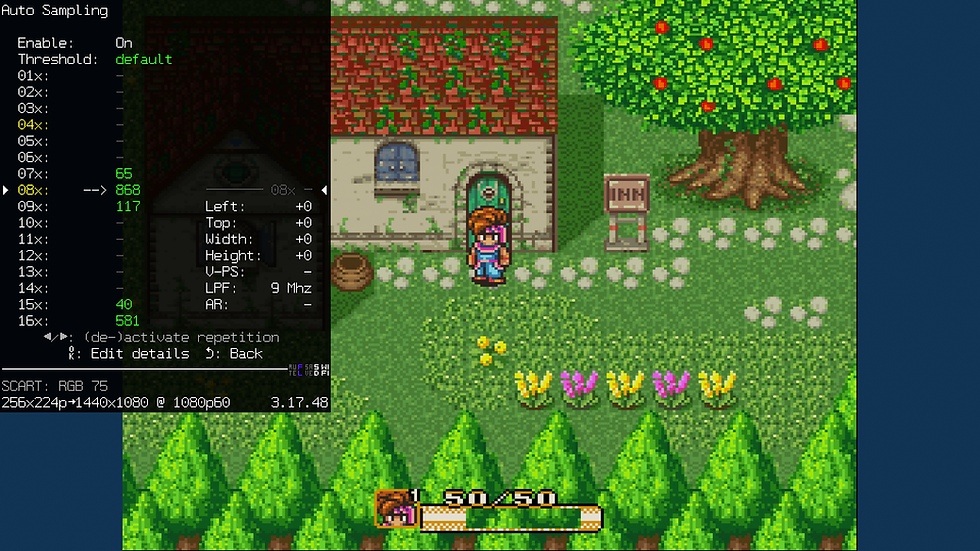
The images below show Auto-Sampling applied to Super Nintendo. In the bottom left of the Morph 4K menu the input resolution is shown. The Secret of Mana menu is properly detected as 512x224p while gameplay is detected as 256x224p. Each detected resolution can have unique video settings applied to it, for example low pass filtering and image shift. This lets the Morph 4K perfectly dial in the video settings for each resolution mode.
While it is straightforward to set up your own auto-sampling profiles, the Pixel FX community has already created ready to use profiles for many consoles. Using auto-sampling is as easy as selecting the SNES console preset, which can be assigned to a remote number key. (screenshot credit: Lo0twig)


Auto-Sampling for HDMI Inputs
The images below show Auto-Sampling applied to Analogue Pocket. In the bottom left of the Morph 4K menu the input resolution is shown. The Pocket menu is properly detected as 1920x1080p while gameplay is detected as 256x224p. This is all done without relying on EDID hacks that trick the Pocket into DAC mode, a huge upgrade in ease of use.
This can also work for many different HDMI inputs, such as those from a Nintendo mini console like the SNES and NES classics. It greatly simplifies getting the best video quality from your HDMI sources, even those which don’t support DV1 and direct video, and it isn’t reliant on using an HDMI switch that can process DV1 metadata.
(screenshot credit: Lo0twig)


Quick Access to Presets via Remote buttons
The Morph 4K now supports preset loading using the remote numerical buttons. Presets can be assigned to buttons using the OSD menu, the process is shown in the images below. Using the remote to quickly load presets combined with the new Auto-Sampling update makes using the Morph 4K with multiple consoles even easier.


