

Morph 4K Firmware v4: Simulating the Physics of Retro Video
Introducing Firmware v4
v4 is the biggest change to the FX-Framework since Pixel FX began. Nearly every FPGA subsystem has been redesigned, from how pixels are fetched from DDR2 memory to how each one is filtered and placed on screen. v4 builds on work that started years ago, and it's out today for the Morph 4K on the beta channel. We'll take it to the stable channel once beta testers have put it through its paces. To update and find your way around the new menus, download the Using v4 guide. The Morph 2K and RetroGEM will get v4 later, starting with their existing features on the new framework, with more to come as we find room for it.
v4 is a generational leap in capability over any FPGA scaler on the market today. The goal was to deliver everything the community has been asking for, and then go somewhere no scaler has gone before.
Under all of it is one idea: model the real physical system. The look we all remember was never a single effect. It came from a chain of real hardware: video encoders, cables, RF modulators, decoders, amplifiers, electron beams and phosphor-coated glass. v4 simulates that chain in real time, on an FPGA.

Take a second look. The soft glow, the fine lines running through the fog, the way the picture curves gently toward its corners: none of it comes from a CRT. There's no tube in this photo, no electron beam, not even an analog signal. It's digital video from a MiSTer, on a modern 4K TV, with a Morph 4K in between. Every detail that tells your eyes "tube" is the Morph 4K simulating the physics, in real time.
We'll start with the platform upgrades and work up to the new features at the end, many of which, to the best of my knowledge, have never appeared on an FPGA video scaler before. There's a lot to cover, so grab a coffee or a tea, let your tube warm up, and settle in.
Unless a caption says it was photographed, every image and video in this post was captured directly from the Morph 4K at 4K, in SDR. On an HDR display, highlights, scanlines and Phosphor Glow can shine far brighter than SDR allows, so it looks even more incredible in person.
v4 at a glance
Platform upgrades: rotation with Auto Rotation, a rational decimator, a rebuilt deinterlacer with a new Film mode, Lanczos and cubic scaling with anti-ringing, Super-xBR alongside xBRZ and Super Eagle, and a refined menu system with a built-in description for every setting.
Meet the PDM-20: a virtual CRT included with every Morph 4K, built on a complete physical model of the display.
Analog Path Simulation: the composite, S-Video and RF signal path, from the console's encoder to the TV's decoder, live on an FPGA.
Beam-to-Glass CRT Simulation: dynamic scanlines, true 480i, convergence that drifts toward the corners, Phosphor Glow, period-correct color, real curvature, Tube Sag and Beam Scan.
Bezel & Glass: bezels with the screen's curved edge drawn live at native 4K, lit by the picture, in a room as dark or as bright as yours.
Processing Engines: four pipelines, each rebuilding the FPGA around one job.
Shader-class simulation, on real hardware: shader-class simulation on real consoles and real signals, and seven firsts for FPGA scalers.
Platform Upgrades
Rotation
Rotation is one of the most requested features we've ever had. The Morph 4K can now rotate the input 90° in either direction, for vertical arcade games, TATE-mode ports and MiSTer cores.
Rotation is fundamentally a memory problem. Reading a frame sideways out of DDR memory is the worst access pattern there is, and the brute-force answer is a huge on-chip frame buffer. We went another way. Taking inspiration from how modern GPUs organize texture memory, we built a locality-preserving spatial memory architecture paired with a multi-bank transposition cache. Pixels are arranged in memory so that reading a column is just as efficient as reading a row, and the transpose happens in the structure of the cache itself.
The result is full-bandwidth rotation with just one frame of latency, for progressive or interlaced sources up to 720p, custom progressive sources up to 2048x1024, and 1080p with the Rational Decimator. For MiSTer owners, this is the feature that makes the HDMI-only Morph 4K a natural partner.
Auto Rotation takes the menu out of it. When a vertical arcade core starts, the Morph 4K switches into Tate Mode by itself and turns the game upright, then switches back when you return to a horizontal game.
Below are two recordings of Tate Mode. The first is DoDonPachi II: Bee Storm, a classic vertical shooter, turned upright and scaled to 4K. The second pushes much further: Ikaruga on the Xbox 360, in the game's own Tate mode, sent to the Morph 4K at 1080p. The Rational Decimator brings the full frame down to 1024 lines, and the Morph 4K rotates all of it at full frame rate, with the same single frame of latency, without breaking a sweat.
Downscaling with the New Rational Decimator
The Morph 4K can now downscale its input by any rational ratio, independently on each axis, with sub-sample phase control on both. The decimation engine distributes its error with mathematical exactness, so no part of the picture is squeezed more than another.
This can fix incorrectly scaled retro ports on modern consoles. More importantly, it can turn almost any source into a clean 240p stream. From there you can apply Retro FX filters to it as if it came from original hardware.
Mega Man 9 in Mega Man Legacy Collection 2 is a good example. The collection scales the game's low-resolution picture to the screen by an uneven amount, so some pixels come out wider than others, with soft, blended columns between them. The Decimator samples the picture back down to the game's original pixel grid, so every pixel is the same width again, and the picture is ready for scanlines and the rest of Retro FX.

Deinterlacer Overhaul
The motion-adaptive deinterlacer was rebuilt from the arithmetic up. Dark scenes no longer show faint combing, moving regions no longer flicker between modes, and a redesigned motion detector separates still from moving content nearly three times more sharply than before, so static detail stays locked in place and analog noise no longer triggers false motion. Chroma is cleaner too.
The hard cases hold up too. Colorful animation, fast-moving sprites and fades between scenes, where deinterlacers have always slipped, now stay clean and comb-free. A Source Noise setting matches it to a clean HDMI source or a noisy analog one.
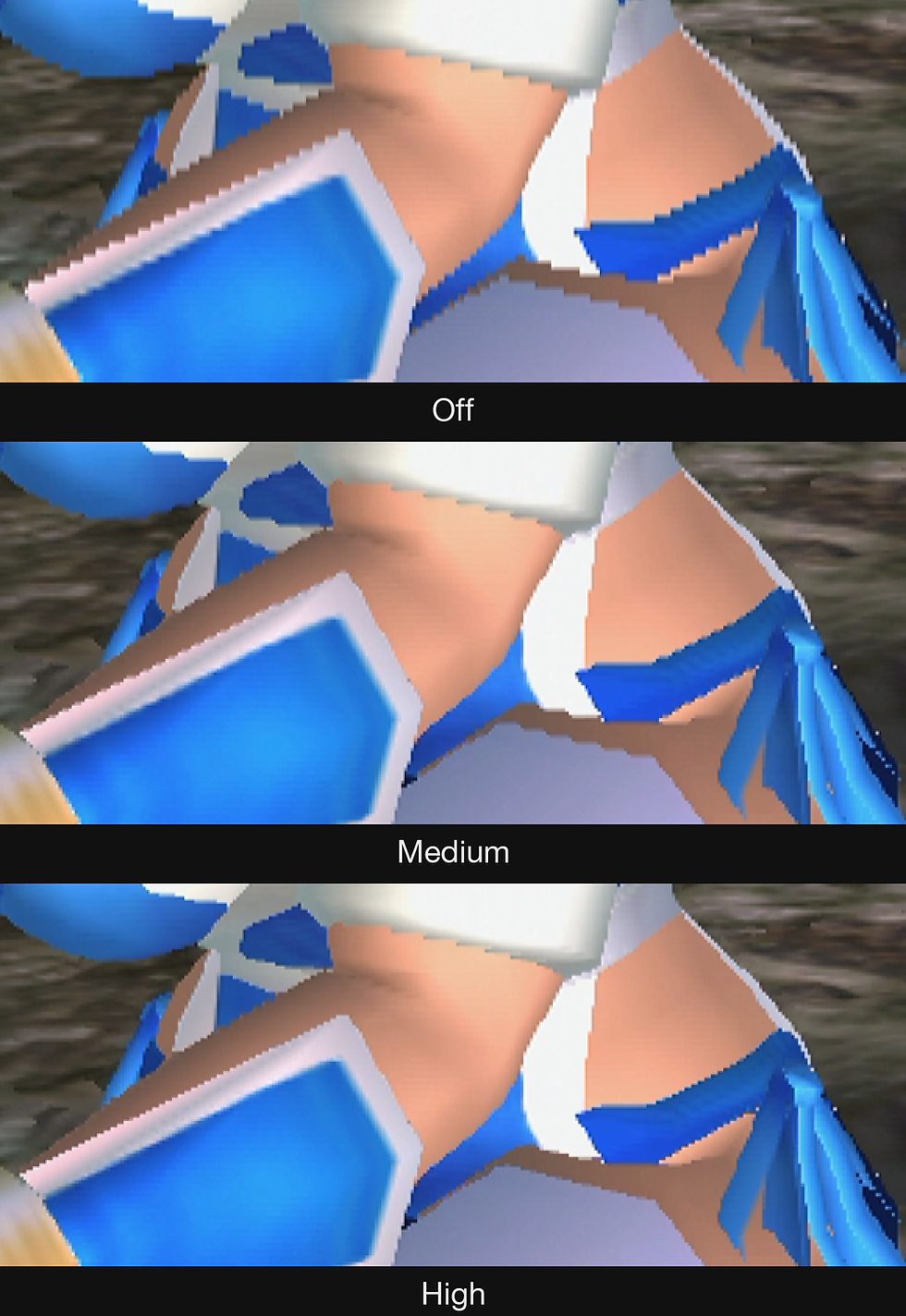
On top of that, the Morph 4K adds edge-adaptive interpolation, now called Edge Smoothing in the menu, with three levels. Where the picture is moving, the engine traces the local edge geometry and reconstructs along the true direction of the detail instead of straight down. Diagonals stay smooth instead of turning into staircases, and fine detail is rebuilt from the source stream rather than blurred away.
High is where Edge Smoothing really shines. Simpler edge smoothing only catches the steeper diagonals, so shallow edges still come out lumpy and wavy. High follows even the shallow, nearly horizontal ones, turning a wavy interpolated edge into one clean, continuous line that looks as if it had been rendered at high resolution in the first place. Set it to High on your favorite 480i games and watch the edges in motion. Prefer a lighter touch? Low and Medium smooth less, so how much smoothing you get is up to you.


Film (Auto)
A lot of 480i was never really interlaced. DVDs carry 24 fps film spread across the fields in a 3:2 pattern, and many PS2-era games render at 30 fps, so each frame is sent as two matching fields. For those sources, any deinterlacer is throwing away detail it could have had.
The new Film (Auto) mode detects that cadence and rebuilds the original full-resolution frames, with no guessing and no combing. It locks within about half a second of a film or a 30 fps game starting. When the content changes to true video, such as a menu, a 60 fps scene or a HUD scrolling on top of film, it falls back to motion-adaptive on its own, then locks again. A readout in the menu shows what it has detected: 3:2 film, 2:2 film or video.
Below are two recordings of Film mode in action. The first is Final Fantasy X, where 2:2 Film mode recovers the game's original 480p frames at 30 fps from the 480i signal: every frame whole and at full resolution, with no combing and none of the softness of deinterlacing. The source is a PS2 with a RetroGEM, sending digital video and audio straight to the Morph 4K. Together, they're without a doubt the best way to experience PlayStation 2 on a modern display.
The second is the original Dragon Ball series on DVD, in 3:2 Film mode. Anime is notoriously hard on deinterlacers, because the way it was produced and edited leaves the film cadence broken up and mixed with true video. Through the Morph 4K, the result is gorgeous. We recorded it over component through the Analog Bridge, the tougher case, since analog noise makes the film cadence harder to pick out, and Film mode still locks on. After finishing Film mode, I tracked down the original Dragon Ball box set just to watch it on the Morph 4K.
This is the most advanced deinterlacer we've ever built, and we think it's something special. Put your toughest 480i through it and let us know what you think.
Scaling for 2D and 3D
Pixel art wants sharp, even pixels. 3D games, video and PC sources want something else: a smooth, detailed picture with no visible pixel grid. v4 improves the scaler for both.
Center-Aligned Phase
The polyphase scaler now uses a center-aligned phase model, sampling the source on a true pixel-center lattice. This has two benefits:
No shift. Turning on interpolation no longer nudges the picture horizontally or vertically. It stays exactly where it belongs.
Scanlines that roll off naturally. At the top and bottom of the picture, the outermost scanline now fades into black instead of repeating the edge line. A real CRT beam has nothing beyond its last line, and now neither does the Morph.
Lanczos and Cubic Kernels with Anti-Ringing
For 3D, video and PC sources, a new scaler looks at twice as many source pixels in each direction, and with it comes a new set of interpolation kernels:
Cubic (Mitchell): balanced, with the least ringing and aliasing. A good all-round choice for 3D games.
Cubic (Catmull-Rom): sharper, keeping more fine texture.
Lanczos: the sharpest of the three, with the most detail in textures and text.
They join the existing Sharp Bilinear and Bilinear options, so pixel art stays crisp.
Sharp kernels have a well-known catch. At a hard edge they overshoot, leaving a faint light or dark halo along the outline, a ripple known as ringing. Anti-Ringing removes it while keeping the kernel's sharpness, so edges stay clean without the softening that usually comes with a halo fix. Choose Light, or Strong for the cleanest edges.
Perceptually Enhanced Super-xBR
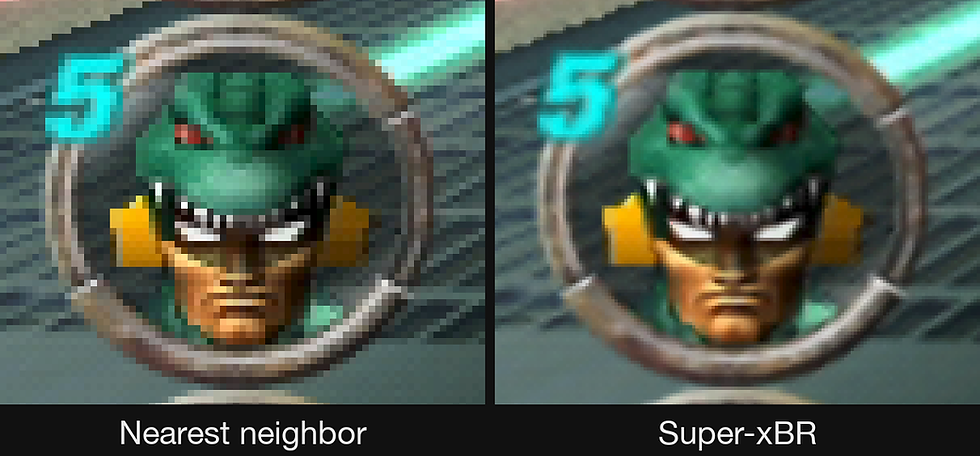
To the best of our knowledge, v4 brings Hyllian's Super-xBR to an FPGA scaler for the first time, with perceptual enhancements of our own.
Super-xBR is a major step up from standard xBR. Standard xBR is great at edges but tends to turn textures and dither into wobbly, painted-looking artifacts. Super-xBR handles edges, textures and dither patterns gracefully. It shines on 480p and above, giving GameCube-era games a significant upgrade, and it even helps early 3D content.
Our enhancements tune the algorithm to human vision. Perceptually weighted edge analysis makes it react to the edges your eye actually sees. Bias-free interpolation keeps edges true to their original brightness. A fully parallel datapath processes full 1080p sources in real time.
Why not just use Lanczos, now that v4 has it? We tried exactly that. Lanczos is a superb general-purpose scaler, and it's our pick for video and most 3D games. But it treats every pixel the same way, so smoothing the jaggies along an edge also softens the detail around it. Super-xBR finds the edges first and smooths along them, so diagonals and curves come out clean while the rest of the picture stays sharper than Lanczos can keep it. Both are in v4, so try them side by side on your own games.

I started on Super-xBR years ago and shelved it to work on other things, but I never stopped wanting to see it running on real hardware. The new v4 framework finally gave it the room it needed, so this was the right time to finish it.
Super-xBR also has company. For 2D pixel art, xBRZ (by Zenju) turns sprite outlines into clean, smooth curves while keeping flat areas of color flat, and Super Eagle (by Kreed) gives a softer, more painterly smoothing that many of us remember from early emulators. We tried many more of the classic pixel-art filters in the lab and kept the three that looked best, so you can pick Super-xBR for 480p and 3D, and xBRZ or Super Eagle for 2D.

A Refined Menu System
The OSD has been through a major refinement: settings are better organized, related options are grouped together, and existing features are presented more clearly, so everything is easier to find, including the things that were already there.
The biggest change is a new description box at the bottom of the menu. Move to any setting and it tells you what that setting does, and often what each value does too. You no longer need the manual open beside you to understand a menu.
You can also customize your input list. Name Port A and Port B after the connector cards you have installed, and hide the inputs you don't use in each port's submenu, so the list shows only what's actually plugged in.

Meet the PDM-20, Your New Virtual CRT
Every Morph 4K now includes a virtual CRT. Meet the PDM-20, the first in our line of virtual displays: a 20-inch tube in its own cabinet, built on everything in Retro FX at once.
PDM stands for Physical Display Model, the Processing Engine it runs on, and the name says how it was made. On the outside, the PDM-20 is a picture of a TV. Underneath, it is a complete physical model of one: the signal path into the set, the beam and how it is aimed, the mask and the phosphors, the light scattering in the glass, the curve of the tube fitted to the cabinet's opening, and the cabinet lit by its own picture. It is the most advanced CRT simulation we have ever built, with every setting tuned to work together as one display.
Every part of it is still yours to adjust. Start from the PDM-20 as it comes, then turn the convergence toward a worn set, swap the mask, or bring up the lights in the room.

A word about pictures before we go on. The PDM-20 is made of light, and it's built to be seen on a 4K display in front of you. Shrink a capture to fit a web page and the fine mask and scanline detail averages away, so the picture looks dimmer and flatter than it really is. The photo above comes closer to how it looks in the room, and seeing it in person is better still.
The rest of this post opens it up. Every part of the PDM-20 lives in Retro FX, in three stages that follow the picture's path: Analog Path Simulation carries the signal into the set, Beam-to-Glass CRT Simulation turns it into light on the tube, and Bezel & Glass puts the tube in its cabinet and the cabinet in a room. We'll start where the picture starts, with the signal.
Retro FX: Analog Path Simulation
In FPGA video scalers, nearly all the effort has gone into the end of the chain: the beam, the mask and the phosphors, what we call CRT simulation. Software emulator and shader developers have done remarkable work on the signal path that came before it, and Analog Path Simulation (APS) brings that level of modeling to an FPGA scaler, to the best of our knowledge for the first time. That path shaped what we saw as much as the tube did. The console's video encoder, the cable, an RF modulator or a VCR, and the TV's decoder, with its own filters and compromises, each left their mark on the picture.
APS takes clean 240p, 480i or 480p video, from analog RGB/YPbPr or straight from HDMI, and passes it through a full physical simulation of that path. It re-encodes the signal into composite or S-Video, optionally sends it through a virtual RF channel, and decodes it again the way a real TV would. Each stage is modeled separately and has its own controls.
Here's what that looks like. In Sonic 2, composite softens the hard pixel edges and blends the sky's dithering, and RF adds the faint diagonal interference of an antenna signal on top. In Joe & Mac, the dithered stone letters and the lake's reflection melt together, with the color shimmer of a real composite picture. In Marble Madness, the thin vertical lines of the course pick up rainbow colors, and the small text fringes with color, just as they did on the original hardware.


You can always plug a composite cable into a scaler, but the result is limited by that scaler's composite decoder and the era it was designed in. APS turns the signal path itself into something you can adjust. It brings real composite character to RetroGEM HDMI-modded consoles and MiSTer, and gives original consoles a look their own outputs never offered.
It All Begins with a Subcarrier
The heart of composite video is the color subcarrier, a 3.58 MHz tone in NTSC (4.43 MHz in PAL) whose phase carries hue and whose amplitude carries saturation. Every console generated it with its own timing relationship to its pixels. That relationship is why Mega Drive waterfalls melt into transparency, why NES artifacts crawl diagonally, and why every console's composite picture has its own fingerprint.
APS models each console's own relationship between its pixels and its subcarrier, so the character of its composite picture comes from the same place it did on the original hardware.
Dot crawl, rainbow artifacts and artifact colors are not overlays drawn on top. They emerge from the physics of encoding and decoding the signal, as they did on the original hardware. Each console's characteristic pattern appears on its own: still stripes on one system, a diagonal crawl on another. For a rock-steady picture, a phase lock option freezes the artifacts in place.

The Full Signal Chain
APS models the complete path, stage by stage:
Encoder. The console's video encoder, including the brightness-dependent hue and saturation distortions of real analog encoders.
RF channel. Antenna and RF-modulator effects: snow, sound-carrier interference, high-frequency rolloff, ghosting from signal reflections, and tuning drift. Ghosts carry the correct color phase, so they interfere with the picture the way real reflections did.
Y/C separation. The TV has to pull brightness and color back apart, and this is where most composite character is born. Choose a simple notch filter, 2-line or 3-line comb filters, or an adaptive comb that responds to picture content as late-model TVs did.
Decoder. Synchronous color demodulation, luma peaking, tint and color controls, and PAL decoding with or without the delay line, Hanover bars included.
Every bandwidth is set in MHz, the same units a TV's service manual uses, so tuning APS is closer to re-engineering a TV than to moving a blur slider.
Every Artifact Is a Knob
In APS, rainbows, dot crawl and dither blending are each independent controls. Turn them down, turn them off, or exaggerate them.
That allows something no real TV could do. Blend-only mode keeps the dither blending that artists designed for while removing the rainbows and dot crawl that came with it. Streets of Rage 2's dithered transparency resolves cleanly, with no rainbow shimmer.

Signal Types and Presets
Composite, S-Video or Blend-only, plus a Y/C crosstalk control to set anything in between.
NTSC, PAL and PAL without delay line.
Console profiles that recreate the subcarrier timing of specific systems.

Paired with the CRT simulation coming up next, especially curvature and true 480i scanlines, it feels like playing on your childhood CRT again. Or on the high-end CRT you never had.
Retro FX: Beam-to-Glass CRT Simulation
APS carries the signal into the TV. From that point on, CRT simulation on FPGA scalers has covered only a narrow slice of the display: a blur for the amplifiers, a mask, scanlines and sometimes a fixed offset between the colors. Those pieces are important, but a tube did far more. Light scattered inside its glass, its colors drifted apart toward the corners, its face was curved, and its raster grew and shrank with the content. Beam-to-Glass CRT Simulation models the display stage by stage: the video amplifiers, the beam and how it is aimed, the phosphors and the faceplate glass, the tube's geometry and high-voltage supply, and the scan itself.
The new CRT Simulation menu puts every effect on one page, grouped by the stage of the tube it models. Pick a look from the list, or open any effect to fine-tune it. We'll take them in menu order:
Stage | Effects |
Signal | Amplifier Blur |
Beam | Scanlines, Convergence |
Screen | Mask, Phosphor Glow, Gamut & White Point |
Tube | Curvature, Tube Sag |
Motion | Beam Scan |

Amplifier Blur
A real CRT drives its electron guns with analog video amplifiers, and every amplifier has a bandwidth limit. That limit softens the signal along each scanline, and game artists counted on it. Dithered patterns and striped pseudo-transparency were designed to melt into smooth color on the TVs of the day: the waterfalls in Sonic 2, the dithered spotlights in Streets of Rage 2, the striped transparency in Kirby's Dream Land 3.
Amplifier Blur is a physically modeled analog filter response that captures the amplifier's frequency rolloff and, where real circuits had it, the overshoot and ringing at sharp edges. It is calibrated in real video bandwidth, so the look stays consistent no matter what sampling mode you are in.
Its looks depend on whether Analog Path Simulation is on. On its own, Amplifier Blur stands in for the whole connection into the set, with looks for Composite, S-Video, RGB Monitor, Arcade and PVM, each modeling the bandwidth and edge character of that class of display. With APS on, the cable and the TV's decoder are already simulated, so Amplifier Blur takes its physical place right after them, as the set's own video amplifier, and its looks change to how sharp that set was. Either way, an Amount control fine-tunes the intensity.


Scanlines
Scanlines now come in three modes. Normal draws lines of one fixed width. Adaptive is our familiar adaptive scanline, now with three looks, Classic, Dark Detail and Deep, and its widths set in source lines. The new Dynamic mode is a full model of the beam, with its own controls, and it builds on what made Adaptive different. The common shortcut is to crossfade between a thin scanline and a thick one. Our Adaptive scanlines never did that: they give every brightness level its own beam profile, computed independently for red, green and blue, so highlights swell and dark detail stays razor-thin. Dynamic is built on that same architecture. Each mode has its main controls up front and its fine-tuning under an Advanced heading on the same page.
For v4 we also re-architected the color pipeline so that scanlines and HDR each work in the domain where they perform best. With HDR enabled, bright scanlines reach well above SDR white while the gaps between them stay black.
Dynamic Scanlines: Energy-Conserving Beams
Scanlines have always come with a catch. Darken the gaps between the lines and you darken the whole picture with them, so most setups trade depth for brightness. A real tube made no such trade. Its beam carried the same energy whatever its width, so a dark line was drawn as a thin, concentrated stripe with a deep gap beside it, and a bright line spread out until it merged with its neighbors.
Dynamic scanlines model exactly that. The beam's width follows the picture's own brightness, and its light is conserved: a flat field is just as bright with scanlines as without them. Shadows get deep, crisp gaps and highlights stay solid and full brightness in the same frame, without the screen-door look of fixed-width lines. Energy-conserving scanlines were pioneered by Timothy Lottes in his CRT shaders, and we're glad to credit him for the idea.
Because the beam is fully modeled, every part of it is yours to shape: its width on dark and on bright content, how quickly it grows, how hard or soft its edges are, a faint halo where the beam spreads at high current, and the gentle flattening of bright lines as the phosphor runs out of light. Light is conserved all the way to peak white, and a new Highlight Knee control gives you the option to ease it off above a level you choose. Beam profiles give you a starting point, from the default Gaussian spot through soft, sharp and flat beams to a PVM, a consumer TV or an arcade monitor. Like every other scanline mode, Dynamic follows the curve of the tube when Curvature is on.
True 480i Scanlines
A CRT never deinterlaced anything. It drew each 480i field as its own pass of scanlines, offset by half a line from the last, and your eye wove the two together. The Morph 4K now does exactly that: every field is drawn as its own set of scanlines, interleaving with the next just as they did on the tube. The result is interlaced video as a CRT showed it, with no deinterlacing involved.
Because the scanline structure is generated by the scaler itself, switching between 240p and 480i is instant, just as it was on the TVs we grew up with. Games that flip between 240p gameplay and 480i menus or cutscenes do it seamlessly.

Convergence
On a CRT, the red, green and blue guns never land perfectly on top of each other, and technicians aligned them with convergence magnets. The Morph 4K now models this, letting you align red and blue against green, horizontally and vertically, with sub-pixel precision, just as a technician would on the set itself. Settings are resolution-independent, so your alignment looks the same on any source. Looks run from a perfectly converged professional monitor through subtle and typical fringing to the tired guns of a well-loved TV.
But a real tube was never converged evenly. A technician could line the guns up perfectly in the center, yet toward the edges and corners, where the beams strike the glass at a steep angle, red and blue drift above and below green again. Corner Convergence models that drift, and it is what turns a color shift into a picture that feels alive. Looks range from a tightly converged PVM to a typical TV, a worn set and an exaggerated setting. Pick one, then fine-tune it with Stretch, which spreads the colors apart toward the top and bottom of the screen, and Tilt, which does the same toward the sides.

Mask
Look closely at any color CRT and the picture dissolves into tiny red, green and blue phosphors, laid out as an aperture grille, a slot mask or a dot triad. At 4K the Morph 4K has enough pixels to draw that structure faithfully. Masks load from the SD card, so you can pick the pattern of the set you remember or make your own, and an intensity control sets how strongly it shows. Masks can be rotated or mirrored for rotated screens and tate games.
Choose an aperture grille and you also get its Damper Wires: the two faint horizontal lines that held the grille steady, familiar to anyone who owned one of those tubes.

Phosphor Glow
A CRT's light comes from phosphor coated on the inside of a thick glass faceplate, and some of it scatters inside that glass before it reaches you. The result is a soft glow around anything bright. It fills the gaps between scanlines and the dark stripes of the mask near a highlight, and lifts the darkness beside it. Fireballs, lasers and white text on black all carry it on a real set, and it is a large part of why a CRT looks luminous.
Phosphor Glow models that scattering across the whole screen, in linear light, and it is energy-conserving: the glow is light moved from the highlight to its surroundings, never light added. A bright field keeps its brightness, and the picture never washes out. Looks range from a clean consumer set to a softer older tube and a bright arcade monitor in a dark room, with controls for strength, size and the tint of the glass. The glow can stop at the picture's edge, or spill into the dark band around it as it did on real glass. To me, this is what gives a CRT its dreamy quality: highlights bloom softly into the darkness around them, and the whole picture seems to glow from inside the tube.

Edge Dimming adds the gentle fall-off in brightness toward the edges and corners of a real tube. It gives the screen depth, so the picture seems to sit behind the glass. Choose Round to dim every edge alike, or Wide to keep a larger bright center and dim mostly the sides.

Gamut & White Point
The colors a game was designed on were the colors of that era's phosphors, and they were not the same everywhere. American sets used SMPTE-C phosphors, European sets EBU, and Japanese sets their own, and Japanese TVs and arcade monitors set white to a noticeably bluer 9300K instead of 6500K.
Gamut & White Point shows colors the way a tube's own phosphors drew them. Looks for a US TV, a PAL TV, a Japanese TV and a Japanese PVM get you there in one step, and separate controls set the phosphors (SMPTE-C, EBU, Japan, Trinitron and NTSC 1953) and the white point, including the 9300K of both Japanese TVs and monitors. Fit to Display brings colors your display can't show just inside its range, so nothing clips. Black level, 7.5 IRE on American NTSC and 0 IRE on Japanese, is set in Analog Path Simulation with the rest of the signal. Switch a Japanese game to the Japan TV look and see it in the colors its artists saw.


Curvature
Real-time CRT curvature on an FPGA has been one of my goals since I started Pixel FX, and v4 is the first time I've been able to build it the way I wanted.
The easy way to fake curvature is to warp a finished, flat image. Do that and the scanlines get bent, resampled and smeared, and they stop looking like scanlines. Our curvature engine models the geometry of the tube itself, so the scanlines bend with the picture, exactly as they do on glass, and stay perfectly intact.

Intact scanlines and a rounded bezel combine for an image that finally looks like it lives behind curved glass.

Tube Sag
A CRT's high-voltage supply sagged whenever the picture got bright, and the raster grew with it. Cut to a white screen and the picture expands slightly; cut back to black and it settles. Few people noticed it consciously, but it was part of how a tube looked in motion. The first time I saw it recreated was on Marshall H.'s UltraHDMI for the N64. That board is part of what got me into FPGA video in the first place, and I've wanted to build this effect ever since.
Tube Sag brings it back. Bright scenes gently swell the picture, and bright lines push out a little further than the lines around them, just as they did on the tube. Pick a Subtle, Normal or Strong look, or set Picture Size, Line Width and Speed yourself. With a bezel in place, the growth happens behind the frame, exactly as it did on a TV, and it works with or without Curvature.
Here it is on Kirby's Dream Land 3 (SNES), captured directly from the Morph 4K. Watch the picture swell as each scene brightens and settle as it fades back to black, with the bezel standing still around it. The bezel is a personal one: it recreates a friend's Sony KV-9PT40. Bringing back a TV you know, whether it's yours or a friend's, is a big part of what bezels are for.

Beam Scan: Blur Busters CRT Beam Simulation and Variable MPRT
Motion clarity fans, rejoice. The Morph 4K now supports CRT Beam Simulation and Variable MPRT black frame insertion, based on algorithms developed by Mark Rejhon of Blur Busters and Timothy Lottes. Both run in high-refresh 1080p output modes as an extension of our BFI engine.
Traditional BFI alternates fully lit and fully dark frames. Both new modes redistribute each frame's light across several output refreshes, per pixel:
CRT Beam Simulation models how a CRT scans out the image. Only a horizontal band of the screen is lit at any moment, rolling down the display just as the beam did.
Variable MPRT gives every pixel its own persistence, based on its brightness. Dark pixels flash briefly for maximum clarity, while bright pixels stay lit longer to hold their brightness. You get BFI-class motion clarity with far less of the brightness penalty.
In the menu, Beam Scan offers classic BFI, Rolling Scan (CRT Beam Simulation) and Bright Strobe (Variable MPRT). Persistence (for BFI and Rolling Scan) and Strobe Length (for Bright Strobe) shorten how long each pixel stays lit, trading brightness for even sharper motion. Each mode needs an output at twice the game's frame rate, 1080p120 for 60 Hz games or 1080p100 for 50 Hz, with MagicLock2 holding the output at exactly twice the game's rate. Until then, the row shows Needs Setup and its page tells you exactly which setting to change.
Retro FX: Bezel & Glass
The tube is only part of what you saw. Between the picture and your eyes sat the glass, the plastic around it and the room you played in. Bezel & Glass is the third Retro FX menu, and it finishes the chain from beam to glass.
Bezel Art
The Morph 4K can now draw a TV, monitor or arcade cabinet around the picture, in full 24-bit color. Bezels load from the SD card as ordinary PNG images, and one setting fits the picture neatly into the bezel's screen opening. The bezel is blended with the picture in linear light, the way light actually mixes, so soft shadows and translucent edges look right.
The Morph 4K ships with the PDM-20's own bezel. Support for making your own, and for Mega Bezel, the bezel format behind many of the community's best-loved sets, is coming in a future update.

Dynamic Bezel Rendering
A bezel image on its own can only be as sharp as its pixels. Scale it up to a 4K screen and every curve along the screen opening turns into a staircase, right where your eye meets the picture. So the Morph 4K doesn't treat the bezel as a flat overlay. It uses dynamic bezel rendering: the bezel art is a 1920x1080 image, but the curved edge of the screen opening, where the glass meets the frame, is drawn by the Morph 4K itself, in real time, at the full native 3840x2160 resolution of your 4K display.
That edge is fitted to the shape of the opening in the art, so the two line up exactly. The art keeps all its painted detail, and the edge of the picture stays smooth and crisp along every curve and around every corner, at four times the pixel count of the art itself.

The bezel works with the rest of the simulation. Curvature rounds the corners of the opening, Tube Sag swells the picture behind the frame, and the picture's light can spill past its edge onto the dark glass around it.
Bezel Reflection
In a dark room, a CRT lit up its own set. The angled plastic lip around the glass caught the picture's light, glowing red when the screen went red and flickering with every explosion. Bezel Reflection recreates that live, from the picture itself, every frame. Looks range from subtle to strong, and each one follows the bezel's own strength, so a glossy cabinet shines more than a matte one.

Cabinet Brightness and Room Light
Two settings set the room around the set. Cabinet Brightness sets how much light falls on the cabinet itself, from a dark room where the bezel is lit only by the picture to full daylight. Room Light adds the faint ambient light that fell on every real screen and lifted its black to a soft gray, the way a TV looked on a Saturday morning. It lifts the cabinet a little too, as a real room does.
Processing Engines
Rather than one generic pipeline that does everything at a compromise, v4 introduces custom-tailored Processing Engines. In chip design, logic that sits idle is called dark silicon, and I see it as waste: a one-size-fits-all pipeline carries every feature at once, and for any given source most of it sits idle. Because the Morph 4K is built on reprogrammable hardware, it can physically rewire itself for the job. Each engine is a complete video pipeline that dedicates the whole FPGA to one goal. Choose an engine and the Morph 4K rebuilds itself around your source.
Engine | Best for | Max input | Deinterlacing | Retro FX |
Physical Display Model | Built for 240p and 480i consoles, and the home of Retro FX and the PDM-20 | 1080p | Seamless 240p/480i | Analog Path Simulation, Beam-to-Glass CRT Simulation, Bezel & Glass |
Universal Adaptive | Any input, heavy 480i content, and 3D, video and PC sources | 1080p | Film (Auto) and motion adaptive, with Edge Smoothing | CRT Simulation |
Spatial Super Resolution | Crisp, smooth pixel art and 3D from progressive sources, with Super-xBR, xBRZ and Super Eagle | 1080p | None (progressive only) | None |
Tate Mode | Vertical arcade games, rotated upright for a normal TV | 720p; 2048x1024 custom progressive; 1080p with the Decimator | Seamless 240p/480i | Scanlines, masks, Phosphor Glow, horizontal curvature and convergence, Bezel & Glass |
The Physical Display Model is built for console resolutions, but it is not limited to them: progressive sources up to 1080p work with nearly everything Universal Adaptive offers them. Beam Scan runs on Universal Adaptive, Spatial Super Resolution and Tate Mode, and is coming to the Physical Display Model in a future update.
A new Processing Engine menu at the top level of the OSD helps you choose. It shows your detected input, marks the engine currently running as [ACTIVE] and the one best suited to your source as [BEST], with a tip tailored to what you are feeding it. Settings are saved per engine, so each one remembers how you like it, and per-game Auto presets are kept per engine too.
![The Processing Engine menu with a 480i source: [BEST] marks the engine suited to the source, [ACTIVE] the one running.](https://static.wixstatic.com/media/382054_6cc6413a826b4dc19d5b4400dc0ba99c~mv2.png/v1/fill/w_980,h_444,al_c,q_90,usm_0.66_1.00_0.01,enc_avif,quality_auto/382054_6cc6413a826b4dc19d5b4400dc0ba99c~mv2.png)
Two Tiers of CRT Simulation
Universal Adaptive includes CRT Simulation: adaptive and dynamic scanlines, true 480i scanlines, masks, convergence, amplifier blur, color gamut and beam scanning. That alone matches the CRT features of today's flagship scalers. Physical Display Model adds Beam-to-Glass CRT Simulation, a new tier: a physical model of the whole display, from the console's video encoder to the light on the bezel around the glass.
Feature | CRT Simulation (Universal Adaptive) | Beam-to-Glass CRT Simulation (Physical Display Model) |
Amplifier Blur | ✓ | ✓ |
Adaptive and Dynamic scanlines | ✓ | ✓ |
True 480i scanlines | ✓ | ✓ |
Masks | ✓ | ✓, plus Damper Wires |
Horizontal and vertical convergence | ✓ | ✓ |
Gamut & White Point | ✓ | ✓ |
Beam Scan | ✓ | In a future update |
Corner Convergence | ✓ | |
Phosphor Glow and Edge Dimming | ✓ | |
Curvature | ✓ | |
Tube Sag | ✓ | |
Analog Path Simulation | ✓ | |
Bezel & Glass: Bezel Art, Bezel Reflection, Cabinet Brightness, Room Light | ✓ |
Shader-Class Simulation, on Real Hardware
Put together, Retro FX puts the Morph 4K in the same class as the most advanced GPU shader setups on PC. Those setups are the work of a talented community of shader developers, and much of this release stands on ideas they explored first. Running a chain that complete at 4K60 typically takes a capable dedicated graphics card. The Morph 4K does it inside a single FPGA, and it brings three things of its own:
Real consoles, real signals. Retro FX works on the live video coming out of your original hardware, not an emulator's frame buffer.
Low latency in every mode. The whole chain runs as the picture streams through, a few lines at a time. The simulation adds lines of delay, not frames.
Fine-grained control, live. Every stage, from the console's video encoder to the light on the bezel, is a setting you can change while the game is running, all in one menu laid out in the order the signal travels.
To the best of my knowledge, no other device combines all three with a simulation this complete, and several of its features have never appeared on an FPGA video scaler before:
Analog Path Simulation: the full composite, S-Video and RF signal path.
Super-xBR: Hyllian's algorithm with our perceptual enhancements, on full 1080p sources.
Corner convergence: the colors drifting apart toward the corners, which static adjustment can't reproduce.
Phosphor Glow: energy-conserving light scattering in the faceplate glass.
Curvature: real tube geometry, with the scanlines drawn along the curve.
Tube Sag: the picture swelling as the tube's high-voltage supply sags.
Bezel Reflection: a bezel lit live by the picture, every frame.
They all serve one goal: making these games look their best. Sometimes that means recreating the tube they were drawn for, and sometimes, as with Super-xBR, it means rethinking them for the display you own today.
What's Next?
Under the hood, v4 is a brand-new code branch and a ground-up refactor, years in the making and long overdue. That new foundation is what made this release possible, and it lets us build and ship features faster than ever. This release is the start, on the Morph 4K and, as we find room, on the Morph 2K and RetroGEM too.
Software is only half of it. We also have new RetroGEMs on the way for more game consoles and handhelds, along with the Infinity Switch and exciting new expansion cards for the Morph 4K (if you're a media preservation fan, you'll want to stay tuned). In short, we're busy in the lab building new retro hardware for everyone to enjoy.
I can't wait to see what you do with v4. Every release, you all find things we never would have: setups we didn't test, settings we didn't think to try, and games that show off a feature better than the ones we picked. Please share your captures, your favorite settings and your bezels. I'll be reading along, and I always learn something.
And to everyone else working on retro video, whether it's hardware, emulators or shaders: your work has pushed us for years, and I hope v4 returns the favor. When any of us gets better, the players win. I'm looking forward to seeing what you make next.
Thank you for being part of this.
Michael (Woozle)
P.S. The Morph 4K is available to pre-order again. For pricing and shipping details, see our pre-order announcement.
Games, characters and artwork shown in this post are the property of their respective owners and are used for illustration only. Mega Bezel bezel art shown is the work of its credited artist. No third-party bezel art ships with the Morph 4K.

